Priručnik Candy FCXP676-1X Pećnica

Trebate priručnik za svoj Candy FCXP676-1X Pećnica? U nastavku možete pogledati i besplatno preuzeti PDF priručnik na hrvatskom jeziku. Ovaj proizvod trenutno ima 5 često postavljanih pitanja, 0 komentara i ima 0 glasova. Ako ovo nije priručnik koji želite, kontaktirajte nas.

Vaš je proizvod neispravan i priručnik ne nudi rješenja? Otvorite Repair Café za besplatne usluge popravka.

Priručnik

Loading…
EN 06
3. Use of the Oven
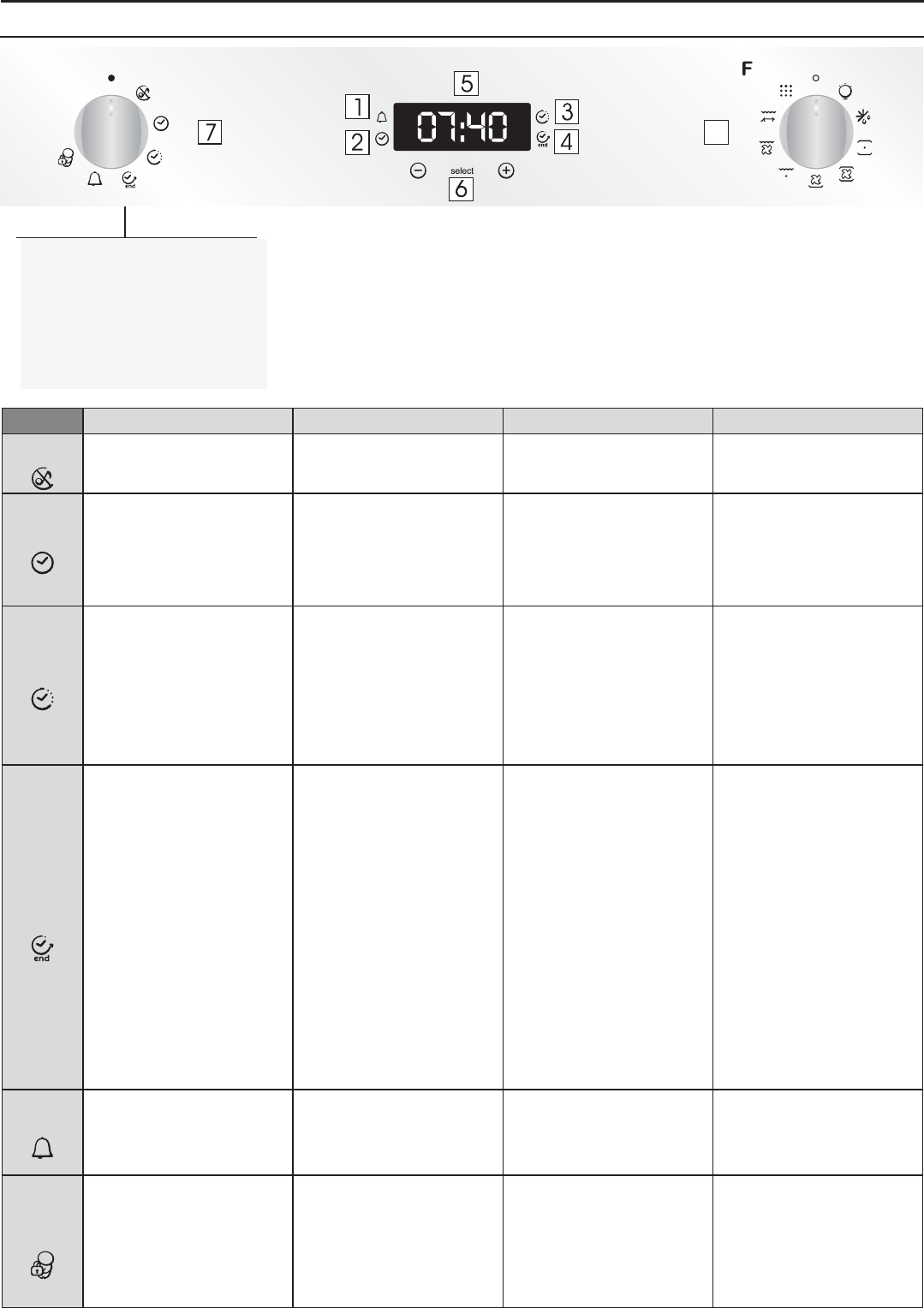
3.1 Display description
WARNING : the first operation to carry out after the oven has
been installed or following the interruption of power supply
(this is recognizable the display pulsating and showing 12:00
) is setting the correct time. This is achieved as follows.
•Push the central button.
•Set time with "-" "+" buttons.
•Release all buttons.
ATTENTION: The oven will only operate providing the clock is set.
1. Minute minder
2. Clock setting
3. Cooking time
4. End of cooking
5. Temperature or clock display
6. LCD display adjustment controls
7. Thermostat selector knob
8. Function selector knob
• Enables you to turn off the
sound of the minute minder.
• Rotate the function selector to
the position OFF.
• To turn off the sound of the
minute minder
• Enables you to set the
time which appears on
the display
• Rotate the function
selector to the position
OFF.
• Turn the right function selector
to a cooking function
• Rotate the left function
selector to the position "End of
cooking"
• Set the end time of cooking by
using buttons " + " and " - "
• Lighting Auto appears
• It allows to preset the end of
cooking time you want.
• When the cooking time is set,
turn the function selector to OFF
to go back to actual time.
• To view the cooking time
selected, turn the left function
selector to End of cooking Time
• When the cooking time has
elapsed, the oven switch off
automatically.
• To stop the cooking functions
early, turn the function control to
OFF
• Turn the left function selector to
the position Minute Minder.
• Set the time of cooking by
using buttons “+”and “-”
Allow to use the oven as
alarm even if the oven is
switch off
• The oven cannot be used.
• To set the time
NB : Set the time when you first
install your oven or just after a
black out (the clock is showing a
pulsating 12.00)
• Turn the right function selector
to a cooking function
• Rotate the left function selector
to the position "Cooking Time
Duration”
• Set the time of cooking by
using buttons " + " and " - "
• Lighting Auto appears
•When the cooking time has
elapsed, the oven switch off
automatically and the alarm rings
for few seconds To stop the
cooking functions early,
turn the function control to OFF or
set the time on 00.00; by rotating
the function selector to Cooking
Time Duration and by using the
buttons " + " and " - “
• It allows to preset the cooking
time required for the recipe
chosen.
• When the cooking time is set,
turn the function selector toOFF to
go back to actual time.
• To view the cooking time
selected, turn the left function
selector to Cooking Time duration.
•This function is normally used with
the COOKING DURATION function
•For example, the desired food
needs to cook for 45 minutes and I
want it to be ready for 12.30; in this
case: at the end of the set time, the
oven automatically switches off and
an alarm sounds. Select the desired
cooking function. Set the cooking
duration to 45 minutes (“-” “+”). Set
the end of cooking to 12:30 (“-” “+”).
Cooking will automatically begin at
11:45 (12:30 minus 45 minutes), at
the end of the set cooking time, the
oven will automatically switch off.
WARNING: by setting only the end
of cooking time, and not the
cooking duration, the oven will
immediately switch on and switch
off at the end of the set cooking
time.
• Set the time on 00.00 by
turning the left function selector
to the position Minute Minder,
and using the button " - “
• Turn the left function selector
to the position Child lock.
• Press the button " + " during 5
seconds
• Child lock is available when "
STOP " appears on display
• Turn back the left function
selector to Child lock and press
button " + " during 5 seconds.
• Indication STOP disappears.
• Rotate the left function
selector to the position “Set the
time”.
• Use the buttons " + " or " - " to
set the time
•Emits an audible signal at the
end of a set time.
•During operation, the display
shows the remaining time.
• This function is useful when
there are children in the house.
FUNCTION
HOW TO ACTIVATE HOW TO DEACTIVATE WHAT IT DOES WHY IT IS NEEDED
SILENCE
MODE
END OF
COOKING
MINUTE
MINDER
CHILD
SAFETY
LOCK
SET
THE TIME
COOKING
DURATION
• For cooking the desired
recipes.
• Rotate the left function selector
to the position " Silence mode “
8
Preuzmite priručnik na hrvatskom jeziku (PDF, 7.73 MB)
(Čuvajte okoliš i ovaj priručnik ispišite samo ako je nužno)

Loading…

Ocjena

Ostavite ocjenu proizvoda Candy FCXP676-1X Pećnica i recite nam što mislite o njemu. Želite podijeliti svoje iskustvo s proizvodom ili postaviti pitanje? Ostavite komentar na dnu stranice.
Jeste li zadovoljni s Candy FCXP676-1X Pećnica?
Da Ne
Prvi ocijenite ovaj proizvod
0 glasovi

Pridružite se razgovoru o ovom proizvodu

Ovdje možete podijeliti što mislite o Candy FCXP676-1X Pećnica. Ako imate pitanja, prvo pažljivo pročitajte priručnik. Zahtjev za priručnik možete izvršiti putem našeg obrasca za kontakt.

Više o ovom priručniku

Razumijemo da je lijepo imati papirnati priručnik za svoj Candy FCXP676-1X Pećnica. Uvijek možete preuzeti priručnik s naše web stranice i sami ga ispisati. Ako želite imati originalni priručnik, preporučujemo da kontaktirate Candy. Oni bi mogli osigurati originalni priručnik. Tražite li priručnik za svoj Candy FCXP676-1X Pećnica na drugom jeziku? Odaberite željeni jezik na našoj početnoj stranici i potražite broj modela da vidite imamo li ga na raspolaganju.

Tehnički podaci

Marka Candy
Model FCXP676-1X
Kategorija Pećnice
Vrsta datoteke PDF
Veličina datoteke 7.73 MB

Svi priručnici za Candy Pećnice
Više priručnika za Pećnice

Često postavljana pitanja o Candy FCXP676-1X Pećnica

Naš tim za podršku pretražuje korisne informacije o proizvodu i odgovore na česta pitanja. Ako u častim pitanjima naiđete na netočne informacije, obratite nam se putem obrasca za kontakt.

Moja se pećnica ne zagrije dovoljno, što da radim? Potvrđeno

Termostat osigurava da se pećnice zagriju do zadane temperature. Vjerojatno je termostat neispravan. Zamijenite ga. Ako sumnjate, obratite se proizvođaču.

Ovo je bilo korisno (3196) Čitaj više

Što je piroliza? Potvrđeno

Neke su pećnice opremljene funkcijom pirolize. Ovo je sustav čišćenja koji sagorijeva nečistoću i masnoću u pećnici korištenjem vrlo visokih temperatura. Nakon pirolize, sva nečistoća pretvorila se u pepeo i lako se može ukloniti. Ako pećnica ima funkciju pirolize, preporučljivo ju je koristiti 3 do 4 puta godišnje kako bi pećnica bila čista.

Ovo je bilo korisno (3190) Čitaj više

Kad koristim pećnicu, često ostane ostataka hrane koja padne na dno i uzrokuje dim. Kako to mogu spriječiti? Potvrđeno

Mnoge pećnice imaju rešetku i pleh. Kad se hrana priprema na rešetki, pladanj za pečenje može se postaviti na dno kako bi se spriječilo da ostaci hrane izgaraju i uzrokuju dim.

Ovo je bilo korisno (817) Čitaj više

Dim se u zagrijavanju nakuplja u pećnici, zašto je to tako? Potvrđeno

Vjerojatno su u pećnici ostali ostaci hrane od prethodne upotrebe. Posebno masni ostaci hrane mogu zagrijavati dim. Temeljito očistite pećnicu.

Ovo je bilo korisno (809) Čitaj više

Mogu li pripremiti nekoliko predmeta istovremeno koristeći više ladica za roštilj? Potvrđeno

Tehnički je to moguće. No, o vrsti hrane ovisi ako trebate prilagoditi vrijeme pripreme ili zamijeniti pladnjeve na pola tijekom pripreme.

Ovo je bilo korisno (807) Čitaj više

Priručnik Candy FCXP676-1X Pećnica

Povezani proizvodi

Povezane kategorije

×
Download