Priručnik Auriol IAN 61430 Meteorološka stanica

Trebate priručnik za svoj Auriol IAN 61430 Meteorološka stanica? U nastavku možete pogledati i besplatno preuzeti PDF priručnik na hrvatskom jeziku. Ovaj proizvod trenutno ima 6 često postavljanih pitanja, 0 komentara i ima 0 glasova. Ako ovo nije priručnik koji želite, kontaktirajte nas.

Vaš je proizvod neispravan i priručnik ne nudi rješenja? Otvorite Repair Café za besplatne usluge popravka.

Priručnik

Loading…

-
3
-
Setting the alarm (2 alarm times)
Briefly press MODE. Now press and hold MODE.
The hour indicator of the first alarm time (A1) will
blink on the display.
Press "+" or "-" to set the hours and confirm your
setting by pressing MODE.
Set the minutes in the same way and confirm your
setting by pressing MODE.
Briefly press MODE 2x. Now press and hold
MODE.
The hours display of the second alarm time (A2)
will now blink on the display.
Press "+" or "-" to set the hours and confirm your
setting by pressing MODE.
Set the minutes in the same way and confirm your
setting by pressing MODE.
Pressing MODE allows you to switch between A1,
A2 and the normal time display.
Activating the alarms and the snooze
feature
Briefly press "+" while viewing A1 or A2 to
activate or deactivate the currently viewed alarm
time.
If the alarm is activated the symbol will appear.
The alarm will sound for 2 minutes when the set
time is reached.
The alarm can be interrupted by pressing
LIGHT/SNZ. The snooze symbol will appear
on the display. The alarm will sound again after 5
minutes.
Press MODE to deactivate snooze and the alarm
sound.
Moon phase indicator
The weather station has a moon phase indicator
which automatically displays the current moon
phase.
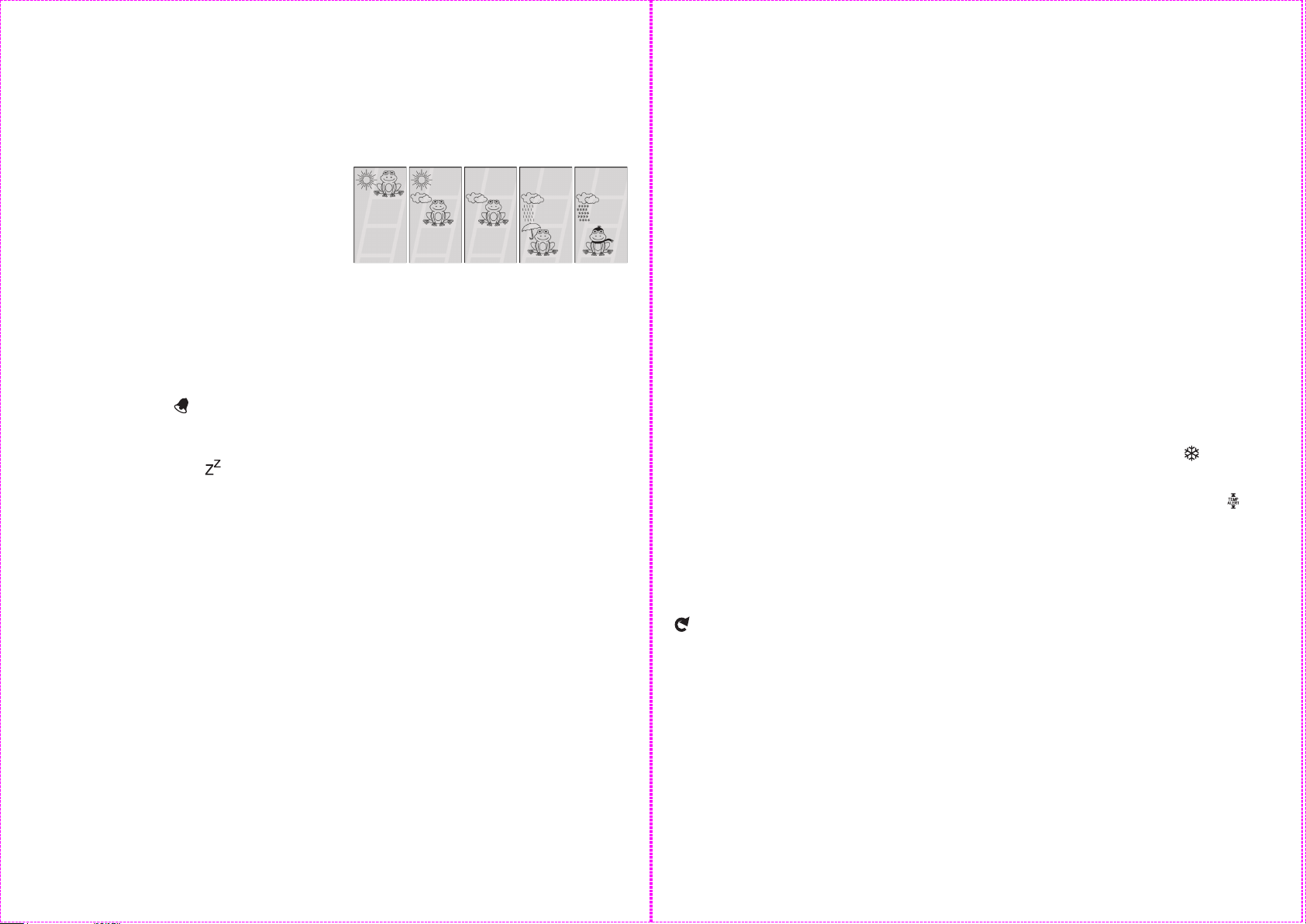
Weather forecast
The weather symbols show the weather tendency
(sun, slightly cloudy, cloudy, rain, snow) for the
next hour and not the current weather.
The weather forecast is calculated by evaluating
the fluctuations in air pressure and can deviate
from actual weather changes.
sunny slightly
cloudy
cloudy rain snow
Barometer
The graphical barometer display shows the air
pressure during the last 12 hours. Press and hold
HISTORY to show the air pressure in mb/hPA or
in HG. Press HISTORY briefly to show the air
pressure values for the last 12 hours. After each
press of the HISTORY button the air pressure will
advance one hour into the past. After hour 12 the
current air pressure will be shown (hour 0).
Calibrating the barometer
The barometer can be calibrated to show the
relative air pressure at your location. The air
pressure for your location can be found on
different sites on the internet. Press and hold
MODE and HISTORY. The air pressure will blink
on the display. Now immediately press "+" or "-" to
set the air pressure. After a few seconds with no
button pressed, the set value will be saved and
the weather station will exit setting mode.
Maximum and minimum values
The maximum and minimum values of
temperature and hygrometer are stored
automatically.
Repeatedly press "+" to view the maximum and
minimum values. Press and hold "+" to reset the
stored values.

-
4
-
Selecting your location
Press CITY- the city display will blink and the
latitude and longitude will be displayed. Press "+"
or "-" to select your location. Press CITY to
confirm your selection. If the abbreviation for you
city does not appear, your location can be set
manually (See "Manually setting your location").
After a short calculation period the weather station
will show the sunrise and sunset times, the moon
phase and neap tide (TIDE LO), medium water
level (TIDE MID) or spring tide (TIDE HI).
Manually setting your location
Press and hold CITY. The cities display shows
"-- -- --". Press "+" or "-" to select the first letters
of your location. Press CITY to confirm your
selection. Set letters 2 and 3 of your location in
the same way.
On the display GMT appears and the time zone
indicator flashes. Set the difference of your time
zone to GMT (Greenwich Mean Time) by pressing
UP and DOWN (For the UK set 0:00).
Press CITY to confirm your selection. Now set the
longitude and latitude of your location in the same
way.
A table with the longitudes and latitudes for some
cities can be found at the end of these operating
instructions.
After a short calculation time the weather station
displays the times for sunrise and sunset and the
moon phase as well as neap tide (TIDE LO),
mean water level (TIDE MID) or spring tide (TIDE
HI).
Outdoor sensor channel selection
Press "CH" on the back side of the weather
station to select channel 1, 2 or 3. If the symbol
appears, the temperature and humidity of the
3 outdoor sensors will alternate on the display.
Press and hold "CH" to restart the outdoor
temperature and humidity reception process.
Additional information for the
outside sensor
Please position your sensor in a covered location
and make sure that the sensor does not get wet
and is not exposed to direct sunlight. To
guarantee optimal radio transmission, position the
station and sensor so that as few obstacles as
possible (walls, metallic components) interfere
with reception.
Sources of electrical interference can also be
detrimental to reception.
Temperature and frost alarms
Setting the temperature alarm
Press "CH" to select the outdoor sensor. Press
and hold "-" to set the alarm temperature. The
outdoor temperature will blink.
Press "+" or "-" to set the maximum value for the
temperature alarm. Confirm your setting by
pressing MODE. Press "+" or "-" to set the
minimum value for the temperature alarm.
Confirm your setting by pressing MODE.
Activating/deactivating the temperature and
frost alarms
The temperature and frost alarms can be
activated or deactivated by repeatedly
pressing "-".
If the frost alarm is activated the symbol will
appear next to the outdoor temperature. The
alarm will sound at the set temperature.
If the temperature alarm is activated the
symbol will appear next to the outdoor
temperature. The alarm will sound at the set
temperature.
If both frost and temperature alarms are activated
then both symbols will appear.
Preuzmite priručnik na hrvatskom jeziku (PDF, 0.41 MB)
(Čuvajte okoliš i ovaj priručnik ispišite samo ako je nužno)

Loading…

Ocjena

Ostavite ocjenu proizvoda Auriol IAN 61430 Meteorološka stanica i recite nam što mislite o njemu. Želite podijeliti svoje iskustvo s proizvodom ili postaviti pitanje? Ostavite komentar na dnu stranice.
Jeste li zadovoljni s Auriol IAN 61430 Meteorološka stanica?
Da Ne
Prvi ocijenite ovaj proizvod
0 glasovi

Pridružite se razgovoru o ovom proizvodu

Ovdje možete podijeliti što mislite o Auriol IAN 61430 Meteorološka stanica. Ako imate pitanja, prvo pažljivo pročitajte priručnik. Zahtjev za priručnik možete izvršiti putem našeg obrasca za kontakt.

Više o ovom priručniku

Razumijemo da je lijepo imati papirnati priručnik za svoj Auriol IAN 61430 Meteorološka stanica. Uvijek možete preuzeti priručnik s naše web stranice i sami ga ispisati. Ako želite imati originalni priručnik, preporučujemo da kontaktirate Auriol. Oni bi mogli osigurati originalni priručnik. Tražite li priručnik za svoj Auriol IAN 61430 Meteorološka stanica na drugom jeziku? Odaberite željeni jezik na našoj početnoj stranici i potražite broj modela da vidite imamo li ga na raspolaganju.

Tehnički podaci

Marka Auriol
Model IAN 61430
Kategorija Meteorološke stanice
Vrsta datoteke PDF
Veličina datoteke 0.41 MB

Svi priručnici za Auriol Meteorološke stanice
Više priručnika za Meteorološke stanice

Često postavljana pitanja o Auriol IAN 61430 Meteorološka stanica

Naš tim za podršku pretražuje korisne informacije o proizvodu i odgovore na česta pitanja. Ako u častim pitanjima naiđete na netočne informacije, obratite nam se putem obrasca za kontakt.

Moja meteorološka postaja prognozirala je kišu, no ona nije pala. Zašto se to dogodilo? Potvrđeno

Prognoze na meteorološkoj postaji temelje se na tlaku zraka. Općenito gledano, nizak tlak znači loše vrijeme, a visok tlak znači dobro vrijeme. Moguće je da se vrijeme razvije drugačije nego što se prognozira prema tlaku zraka.

Ovo je bilo korisno (1467) Čitaj više

Koji je broj modela mog proizvoda Auriol? Potvrđeno

Iako neki proizvodi Auriol imaju alternativni broj modela, svi oni imaju IAN broj s kojim se proizvod može identificirati.

Ovo je bilo korisno (700) Čitaj više

Koje je najbolje mjesto za meteorološku stanicu i njene senzore? Potvrđeno

Sama meteorološka stanica smještena je unutra i treba je držati podalje od izvora topline poput kuhinje, prozora ili električnih uređaja. Zasebni senzor vanjske temperature treba postaviti u sjenu i najmanje 1,25 m iznad tla. Senzor za kišu treba postaviti na otvoreno područje gdje uvijek može skupljati kišu. Senzor za vjetar također treba postaviti na otvoreno područje, sa svim preprekama koje utječu na vjetar.

Ovo je bilo korisno (394) Čitaj više

Moja meteorološka stanica ima mjerač kiše, može li mjeriti i količinu snijega? Potvrđeno

Neki su mjerači kiše opremljeni grijaćim elementom, što čini snijeg topljenjem i omogućuje mu mjerenje. Bez grijaćeg elementa, kišomjer će se začepiti i ne može se izvršiti mjerenje.

Ovo je bilo korisno (280) Čitaj više

Baterija u mom uređaju je oksidirana, mogu li je i dalje sigurno koristiti? Potvrđeno

Da, uređaj se i dalje može sigurno koristiti. Prvo uklonite oksidirajuću bateriju. Nikad to nemojte koristiti golim rukama. Zatim očistite odjeljak za baterije pamučnom krpom umočenom u ocat ili limunov sok. Ostavite da se osuši i umetnite nove baterije.

Ovo je bilo korisno (279) Čitaj više

Mogu li dulje vrijeme u uređaju ostaviti zamjenjivu bateriju? Potvrđeno

Zamjenjive baterije mogu dugo ostati u uređaju ako se uređaj koristi. Kad se uređaj čuva dulje vrijeme, preporučljivo je izvaditi baterije kako biste spriječili oksidaciju.

Ovo je bilo korisno (279) Čitaj više
Priručnik Auriol IAN 61430 Meteorološka stanica

Povezani proizvodi

Povezane kategorije

×
Download