RQT9988
4
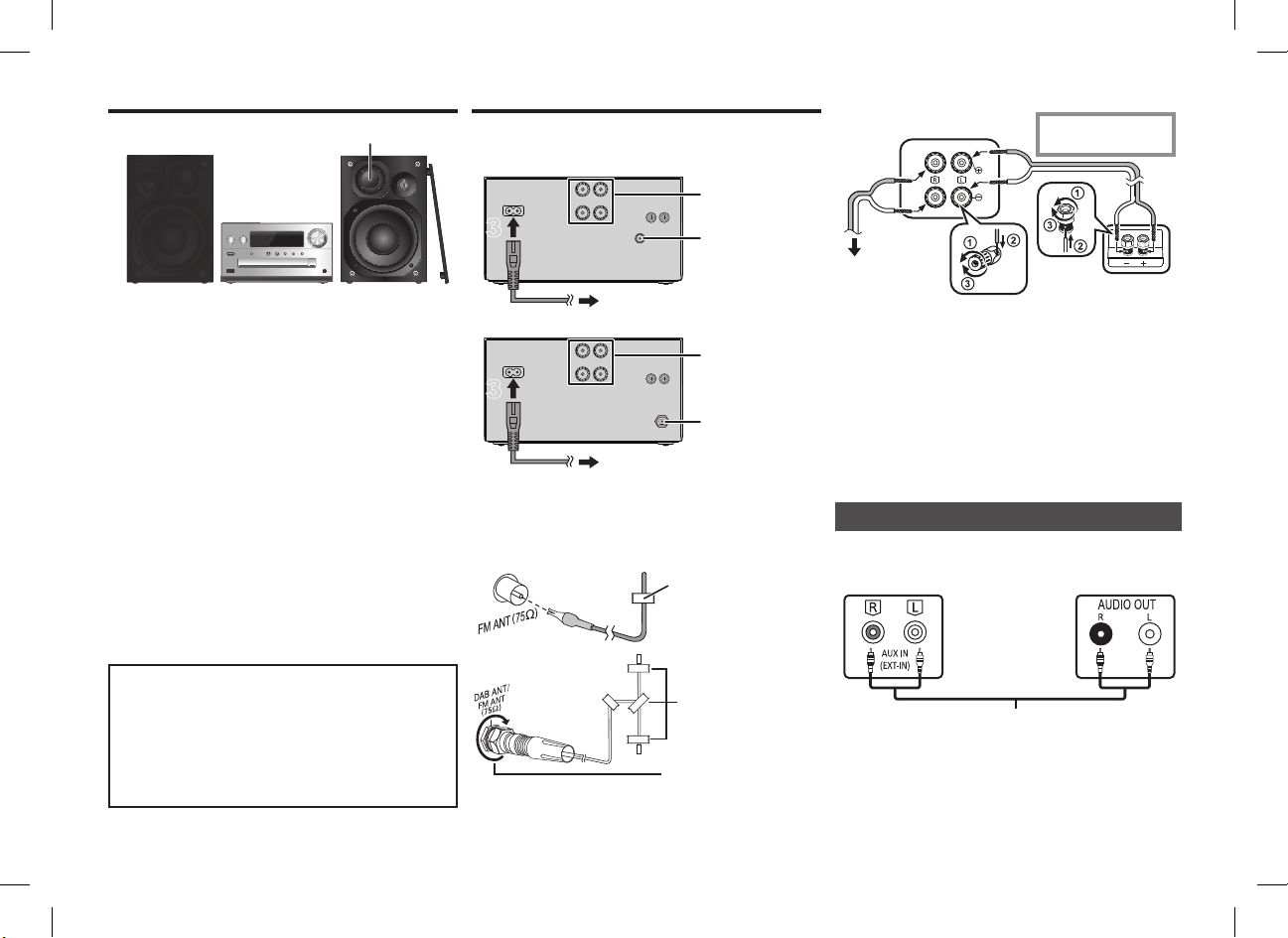
Placement of speakers
Place the speakers so that the tweeter is on the inner
side. To prevent damage to the speakers, do not touch
the speaker cones if you remove the nets.
Use only the supplied speakers.
The combination of the main unit and speakers give the
best sound. You can cause damage to the system and
decrease the sound quality if you use other speakers.
Note:
• Keep your speakers more than 10 mm from the main unit
for ventilation.
• Put the speakers on a flat safe surface.
• These speakers do not have magnetic shielding. Do not
put them near TVs, PCs or other equipment easily
influenced by magnetism.
• When you play at high levels for a long period, it can cause
damage to the system and decrease the life of the system.
• Decrease the volume in these conditions to prevent
damage:
- When you play distorted sound.
- When you adjust the sound quality.
Making the connections
Connect the AC mains lead only after all the other
connections have been made.
[PMX70]
[PMX70B]
1 Connect the antenna.
Place the antenna where reception is best.
• If radio reception is poor, use an outdoor antenna
(not supplied).
[PMX70]
2 Connect the speakers.
Be careful not to cross (short-circuit) or reverse
the polarity of the speaker wires as doing so may
damage the speakers.
3 Connect the AC mains lead.
Do not use an AC mains lead with other equipment.
Conserving power
The system consumes a small amount of power (> 14),
even when it is in standby mode. Disconnect the power
supply if you do not use the system.
Some settings will be lost after you disconnect the
system. You have to set them again.
You can connect a VCR, DVD player etc.
Note:
• Disconnect the AC mains lead before connection.
• Switch off all equipment and read the appropriate operating
instructions.
• Components and cables are sold separately.
• If you want to connect equipment other than those
described, refer to the audio dealer.
• Sound distortion can occur when you use an adaptor.
CAUTION!
• Use the speakers only with the recommended
system. If not, you can cause damage to the
amplifier and speakers and can cause a fire.
Consult an approved service personnel if damage
occurs or if there is a sudden apparent change in
performance.
• Do the procedures included in these instructions
when you attach the speakers.
To household mains socket
To household mains socket
Tape
(not supplied)
Be sure to fully tighten
the nut.
[PMX70B]
Connecting other equipment
i: Copper
j: Silver
Main unit (rear)
To right speaker
(rear)
Left speaker (rear)
e.g. DVD player
(not supplied)
Main unit (rear)
Audio cable (not supplied)
SC-PMX70-70B_EGEBGN-RQT9988-B.book 4 ページ 2014年12月29日 月曜日 午後1時21分
RQT9988
4
Placement of speakers
Place the speakers so that the tweeter is on the inner
side. To prevent damage to the speakers, do not touch
the speaker cones if you remove the nets.
Use only the supplied speakers.
The combination of the main unit and speakers give the
best sound. You can cause damage to the system and
decrease the sound quality if you use other speakers.
Note:
• Keep your speakers more than 10 mm from the main unit
for ventilation.
• Put the speakers on a flat safe surface.
• These speakers do not have magnetic shielding. Do not
put them near TVs, PCs or other equipment easily
influenced by magnetism.
• When you play at high levels for a long period, it can cause
damage to the system and decrease the life of the system.
• Decrease the volume in these conditions to prevent
damage:
- When you play distorted sound.
- When you adjust the sound quality.
Making the connections
Connect the AC mains lead only after all the other
connections have been made.
[PMX70]
[PMX70B]
1 Connect the antenna.
Place the antenna where reception is best.
• If radio reception is poor, use an outdoor antenna
(not supplied).
[PMX70]
2 Connect the speakers.
Be careful not to cross (short-circuit) or reverse
the polarity of the speaker wires as doing so may
damage the speakers.
3 Connect the AC mains lead.
Do not use an AC mains lead with other equipment.
Conserving power
The system consumes a small amount of power (> 14),
even when it is in standby mode. Disconnect the power
supply if you do not use the system.
Some settings will be lost after you disconnect the
system. You have to set them again.
You can connect a VCR, DVD player etc.
Note:
• Disconnect the AC mains lead before connection.
• Switch off all equipment and read the appropriate operating
instructions.
• Components and cables are sold separately.
• If you want to connect equipment other than those
described, refer to the audio dealer.
• Sound distortion can occur when you use an adaptor.
CAUTION!
• Use the speakers only with the recommended
system. If not, you can cause damage to the
amplifier and speakers and can cause a fire.
Consult an approved service personnel if damage
occurs or if there is a sudden apparent change in
performance.
• Do the procedures included in these instructions
when you attach the speakers.
11
3
3
To household mains socket
11
3
3
To household mains socket
Tape
(not supplied)
Be sure to fully tighten
the nut.
[PMX70B]
Connecting other equipment
i: Copper
j: Silver
Main unit (rear)
To right speaker
(rear)
Left speaker (rear)
e.g. DVD player
(not supplied)
Main unit (rear)
Audio cable (not supplied)
SC-PMX70-70B_EGEBGN-RQT9988-B.book 4 ページ 2014年12月29日 月曜日 午後1時21分
RQT9988
4
Placement of speakers
Place the speakers so that the tweeter is on the inner
side. To prevent damage to the speakers, do not touch
the speaker cones if you remove the nets.
Use only the supplied speakers.
The combination of the main unit and speakers give the
best sound. You can cause damage to the system and
decrease the sound quality if you use other speakers.
Note:
• Keep your speakers more than 10 mm from the main unit
for ventilation.
• Put the speakers on a flat safe surface.
• These speakers do not have magnetic shielding. Do not
put them near TVs, PCs or other equipment easily
influenced by magnetism.
• When you play at high levels for a long period, it can cause
damage to the system and decrease the life of the system.
• Decrease the volume in these conditions to prevent
damage:
- When you play distorted sound.
- When you adjust the sound quality.
Making the connections
Connect the AC mains lead only after all the other
connections have been made.
[PMX70]
[PMX70B]
1 Connect the antenna.
Place the antenna where reception is best.
• If radio reception is poor, use an outdoor antenna
(not supplied).
[PMX70]
2 Connect the speakers.
Be careful not to cross (short-circuit) or reverse
the polarity of the speaker wires as doing so may
damage the speakers.
3 Connect the AC mains lead.
Do not use an AC mains lead with other equipment.
Conserving power
The system consumes a small amount of power (> 14),
even when it is in standby mode. Disconnect the power
supply if you do not use the system.
Some settings will be lost after you disconnect the
system. You have to set them again.
You can connect a VCR, DVD player etc.
Note:
• Disconnect the AC mains lead before connection.
• Switch off all equipment and read the appropriate operating
instructions.
• Components and cables are sold separately.
• If you want to connect equipment other than those
described, refer to the audio dealer.
• Sound distortion can occur when you use an adaptor.
CAUTION!
• Use the speakers only with the recommended
system. If not, you can cause damage to the
amplifier and speakers and can cause a fire.
Consult an approved service personnel if damage
occurs or if there is a sudden apparent change in
performance.
• Do the procedures included in these instructions
when you attach the speakers.
To household mains socket
To household mains socket
Tape
(not supplied)
Be sure to fully tighten
the nut.
[PMX70B]
Connecting other equipment
i: Copper
j: Silver
Main unit (rear)
To right speaker
(rear)
Left speaker (rear)
e.g. DVD player
(not supplied)
Main unit (rear)
Audio cable (not supplied)
SC-PMX70-70B_EGEBGN-RQT9988-B.book 4 ページ 2014年12月29日 月曜日 午後1時21分
RQT9988
4
Placement of speakers
Place the speakers so that the tweeter is on the inner
side. To prevent damage to the speakers, do not touch
the speaker cones if you remove the nets.
Use only the supplied speakers.
The combination of the main unit and speakers give the
best sound. You can cause damage to the system and
decrease the sound quality if you use other speakers.
Note:
• Keep your speakers more than 10 mm from the main unit
for ventilation.
• Put the speakers on a flat safe surface.
• These speakers do not have magnetic shielding. Do not
put them near TVs, PCs or other equipment easily
influenced by magnetism.
• When you play at high levels for a long period, it can cause
damage to the system and decrease the life of the system.
• Decrease the volume in these conditions to prevent
damage:
- When you play distorted sound.
- When you adjust the sound quality.
Making the connections
Connect the AC mains lead only after all the other
connections have been made.
[PMX70]
[PMX70B]
1 Connect the antenna.
Place the antenna where reception is best.
• If radio reception is poor, use an outdoor antenna
(not supplied).
[PMX70]
2 Connect the speakers.
Be careful not to cross (short-circuit) or reverse
the polarity of the speaker wires as doing so may
damage the speakers.
3 Connect the AC mains lead.
Do not use an AC mains lead with other equipment.
Conserving power
The system consumes a small amount of power (> 14),
even when it is in standby mode. Disconnect the power
supply if you do not use the system.
Some settings will be lost after you disconnect the
system. You have to set them again.
You can connect a VCR, DVD player etc.
Note:
• Disconnect the AC mains lead before connection.
• Switch off all equipment and read the appropriate operating
instructions.
• Components and cables are sold separately.
• If you want to connect equipment other than those
described, refer to the audio dealer.
• Sound distortion can occur when you use an adaptor.
CAUTION!
• Use the speakers only with the recommended
system. If not, you can cause damage to the
amplifier and speakers and can cause a fire.
Consult an approved service personnel if damage
occurs or if there is a sudden apparent change in
performance.
• Do the procedures included in these instructions
when you attach the speakers.
To household mains socket
To household mains socket
Tape
(not supplied)
Be sure to fully tighten
the nut.
[PMX70B]
Connecting other equipment
i: Copper
j: Silver
Main unit (rear)
To right speaker
(rear)
Left speaker (rear)
e.g. DVD player
(not supplied)
Main unit (rear)
Audio cable (not supplied)
SC-PMX70-70B_EGEBGN-RQT9988-B.book 4 ページ 2014年12月29日 月曜日 午後1時21分
RQT9988
4
Placement of speakers
Place the speakers so that the tweeter is on the inner
side. To prevent damage to the speakers, do not touch
the speaker cones if you remove the nets.
Use only the supplied speakers.
The combination of the main unit and speakers give the
best sound. You can cause damage to the system and
decrease the sound quality if you use other speakers.
Note:
• Keep your speakers more than 10 mm from the main unit
for ventilation.
• Put the speakers on a flat safe surface.
• These speakers do not have magnetic shielding. Do not
put them near TVs, PCs or other equipment easily
influenced by magnetism.
• When you play at high levels for a long period, it can cause
damage to the system and decrease the life of the system.
• Decrease the volume in these conditions to prevent
damage:
- When you play distorted sound.
- When you adjust the sound quality.
Making the connections
Connect the AC mains lead only after all the other
connections have been made.
[PMX70]
[PMX70B]
1 Connect the antenna.
Place the antenna where reception is best.
• If radio reception is poor, use an outdoor antenna
(not supplied).
[PMX70]
2 Connect the speakers.
Be careful not to cross (short-circuit) or reverse
the polarity of the speaker wires as doing so may
damage the speakers.
3 Connect the AC mains lead.
Do not use an AC mains lead with other equipment.
Conserving power
The system consumes a small amount of power (> 14),
even when it is in standby mode. Disconnect the power
supply if you do not use the system.
Some settings will be lost after you disconnect the
system. You have to set them again.
You can connect a VCR, DVD player etc.
Note:
• Disconnect the AC mains lead before connection.
• Switch off all equipment and read the appropriate operating
instructions.
• Components and cables are sold separately.
• If you want to connect equipment other than those
described, refer to the audio dealer.
• Sound distortion can occur when you use an adaptor.
CAUTION!
• Use the speakers only with the recommended
system. If not, you can cause damage to the
amplifier and speakers and can cause a fire.
Consult an approved service personnel if damage
occurs or if there is a sudden apparent change in
performance.
• Do the procedures included in these instructions
when you attach the speakers.
To household mains socket
To household mains socket
Tape
(not supplied)
Be sure to fully tighten
the nut.
[PMX70B]
Connecting other equipment
i: Copper
j: Silver
Main unit (rear)
To right speaker
(rear)
Left speaker (rear)
e.g. DVD player
(not supplied)
Main unit (rear)
Audio cable (not supplied)
SC-PMX70-70B_EGEBGN-RQT9988-B.book 4 ページ 2014年12月29日 月曜日 午後1時21分
4
RQT9988
Povezivanje
Spojite kabel za napajanje izmjeničnom strujom tek
nakon što dovršite sva ostala spajanja.
1 Spojite antenu.
Stavite antenu tamo gdje je prijam najbolji.
• Ako je prijam radijskih signala slab, upotrijebite vanjsku
antenu (nije isporučena).
Postavljanje zvučnika
Visokotonac
Postavite zvučnike tako da je visokotonac na unutrašnjoj
strani. Da biste spriječili oštećenje zvučnika, nemojte
dodirivati unutrašnjost zvučnika ako skinete mrežicu koja
se nalazi na njemu.
Koristite samo isporučene zvučnike.
Kombinacija glavne jedinice i zvučnika daje najbolji
zvuk. U slučaju upotrebe drugih zvučnika moglo bi doći
do oštećenja sustava i pogoršanja kvalitete zvuka.
Napomena:
• Držite zvučnike na udaljenosti većoj od 10 mm od glavne
jedinice radi ventilacije.
• Stavite zvučnike na ravnu, stabilnu površinu.
• Ovi zvučnici nisu magnetski oklopljeni. Nemojte ih stavljati
blizu TV-prijamnika, računala ili drugih uređaja podložnih
utjecaju magnetizma.
• Kada reproducirate zvuk pri visokoj razini dulje vrijeme,
može se oštetiti sustav i smanjiti vijek trajanja sustava.
• U sljedećim uvjetima smanjite glasnoću da biste spriječili
oštećenja:
- Kada je zvuk izobličen.
- Kada podešavate kvalitetu zvuka.
OPREZ!
• Zvučnicima se koristite samo s preporučenim
sustavom. Inače bi moglo doći do oštećenja
pojačala i zvučnika te požara. Ako dođe do
oštećenja ili iznenadne promjene u radu
uređaja, obratite se ovlaštenom serviseru.
• Postupite na način naveden u ovim uputama
prilikom spajanja zvučnika.
2 Spojite zvučnike.
Pazite da ne biste unakrsno spojili žice zvučnika
(kratki spoj) ili okrenuli njihov polaritet jer to
može dovesti do oštećenja zvučnika.
3 Spojite kabel za napajanje izmjeničnom strujom.
Nemojte upotrebljavati kabel za napajanje
izmjeničnom strujom s drugom opremom.
Ušteda energije
Sustav troši malu količinu struje ( 14), čak i kad je u stanju
čekanja. Isključite napajanje ako se ne koristite sustavom.
Neke će se postavke poništiti nakon isključivanja
sustava. Morat ćete ih ponovno postaviti.
Spajanje druge opreme
Možete spojiti videosnimač, DVD-čitač itd.
Audiokabel (nije isporučen)
Napomena:
• Odspojite kabel za napajanje izmjeničnom strujom prije
povezivanja.
• Isključite svu opremu i pročitajte odgovarajuće upute za uporabu.
• Komponente i kabeli prodaju se odvojeno.
• Ako želite spojiti opremu osim one opisane, obratite se
prodavaču audioopreme.
• U slučaju uporabe prilagodnika može doći do izobličenja
zvuka.
U strujnu utičnicu
Glavna jedinica (straga)
Glavna jedinica
(straga)
Lijevi zvučnik (stražnji)
U strujnu utičnicu
Ljepljiva traka
(nije isporučen)
Bakar
Srebro
U desni zvučnik
(stražnji)
npr. DVD-čitač
(nije isporučen)
Obavezno do kraja
zategnite maticu.
Ljepljiva traka
(nije isporučena)


Pridružite se razgovoru o ovom proizvodu
Ovdje možete podijeliti što mislite o Panasonic SC-PMX70 Stereo komplet. Ako imate pitanja, prvo pažljivo pročitajte priručnik. Zahtjev za priručnik možete izvršiti putem našeg obrasca za kontakt.