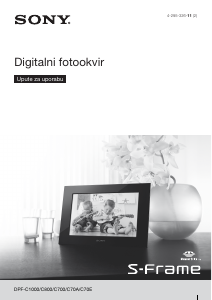
Priručnik Sony DPF-C800 Digitalni okvir za fotografije

Trebate priručnik za svoj Sony DPF-C800 Digitalni okvir za fotografije? U nastavku možete pogledati i besplatno preuzeti PDF priručnik na hrvatskom jeziku. Ovaj proizvod trenutno ima 2 često postavljanih pitanja, 0 komentara i ima 0 glasova. Ako ovo nije priručnik koji želite, kontaktirajte nas.

Vaš je proizvod neispravan i priručnik ne nudi rješenja? Otvorite Repair Café za besplatne usluge popravka.

Priručnik

Loading…
10
Pregled postavki izbornika
Postavke
slideshowa
Interval
prikaza slika
Izmjenjuje slike u kratkim intervalima (oko 10 sekundi).
Izmjenjuje slike u umjerenim intervalima (oko 30 sekundi).
Izmjenjuje slike u dugim intervalima (oko 60 sekundi).
Način prikaza
Prikazuje cijelu sliku na zaslonu. (Slika može biti prikazana s crnim rubovima s
gornje, donje, lijeve i desne strane.)
Prikazuje cijelu sliku na zaslonu s djelomično odrezanim rubovima bez mijenjanja
formata slike.
Efekt
Center cross: Prijelaz na sljedeću sliku na način da se prethodna slika pomiče iz
središta u jedan od četiri ugla.
Blind (okomito): Prijelaz na sljedeću sliku kao da se okomito spušta zastor.
Viewing index display
A list in thumbnails of the images stored in memory card is displayed.
¼
ˎ
A thumbnail means a small image for review registered for an image file taken by a digital camera.
1 Press [MENU].
2 Press
R
/
C
to select (Index) then press [ENTER].
To display a single image (single view)
Press
R
/
C
to select the desired image on the index display then press [ENTER]. The selected single view image
is displayed.
The slideshow begins once you press [ENTER] during display of a single view image.
Changing the menu settings
1 Press [MENU].
2 Press
R
/
C
to select (Settings) then press [ENTER].
3 Change the settings, using
R
/
C
and [ENTER], referring to
“Overview of the menu items”.
4 Press [MENU] to close the menu.
¼
ˎ To return to the previous display, select at lower right then press [ENTER].
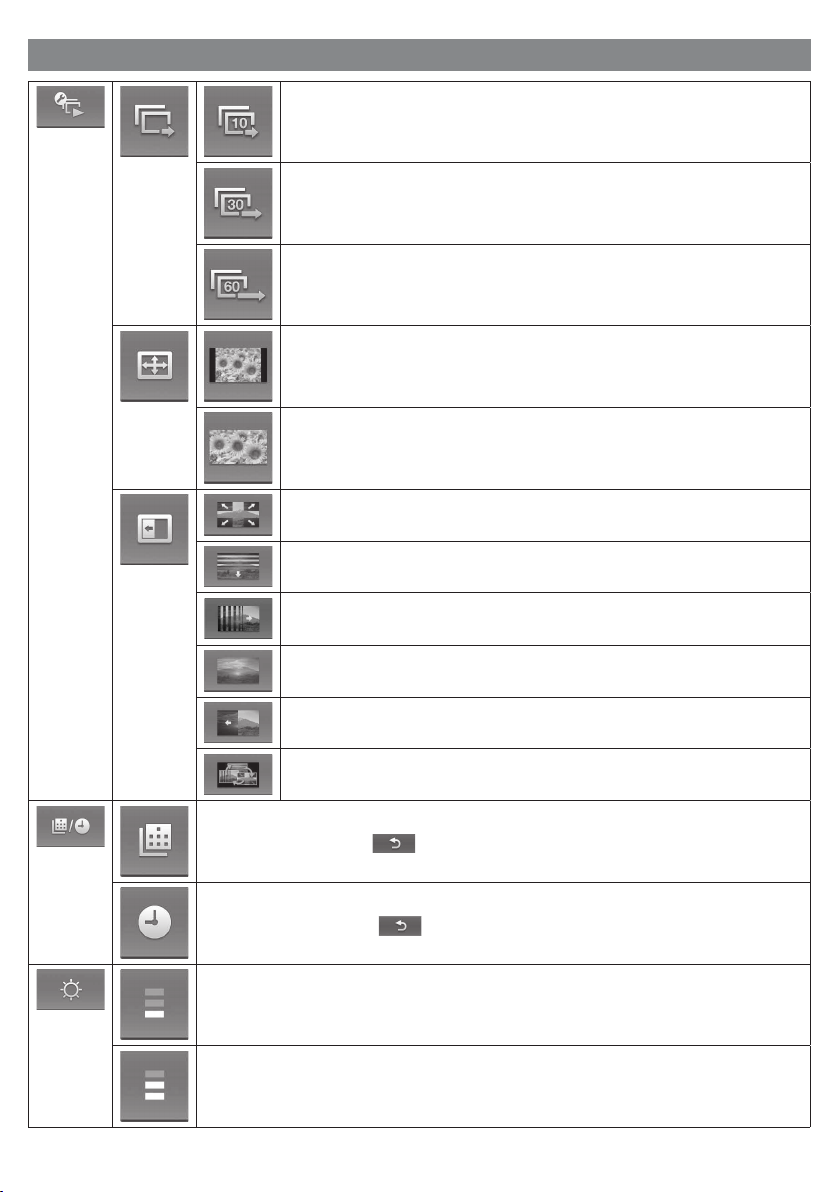
Overview of the menu items
Slideshow
settings
Photo Interval
Switches images at a short interval (approximately 10 seconds).
Switches images at a moderate interval (approximately 30 seconds).
Switches images at a long interval (approximately 60 seconds).
Display mode
Displays an entire image on the screen. (Some image may be displayed with black
margins at the top, bottom, left and right.)
Displays an image on the entire screen by partially trimming the borders without
changing the aspect ratio.
Effect
Center cross: Transitions to the next image as though the previous image were being
pushed from the center to the four corners.
Blind (vertically): Transitions to the next image as though blinds were being lowered
vertically.
Blind (holizontally): Transitions to the next image as though blinds were being pulled
horizontally.
Fade: Transitions to the next image by fading the current image out and fading the next
image in.
Wipe: Transitions to the next image as though the current image were being wiped off
the screen to reveal the next image.
Random: Switching images by using the above five effects randomly.
Date/Time
settings
Sets the date. Select at lower on the display then press [ENTER].
Sets the time. Select at lower on the display then press [ENTER].
LCD brightness
settings
Adjusts the brightness to dimmer.
Adjusts the brightness to a moderate level.
Adjusts the brightness to brighter. The display becomes brightest.
Timer settings
Yo u can select either of two types for the timer.
For details, see “To set the timer”.
Demonstration
mode setting
Activates demonstration display while no memory card is inserted.
Activates clock display while no memory card is inserted.
Initialize
setting
Deletes all settings and return to the factory-set status.
Returns to the menu display without initializing.
To set the timer
1 Press [MENU], select (Settings) with
R
/
C
then press [ENTER].
2 Select (Timer settings) with
R
/
C
then press [ENTER].
3 Select a timer to be set with
R
/
C
then press [ENTER].
: The power is automatically turned off after the interval you have selected for this has passed with no
operation (Auto OFF setting).
: Turn on or off the power at the specified time (Auto power ON/OFF setting).
4 Set the time to activate the timer.
Auto OFF setting
ʓ
Press
R
/
C
to select a time then press [ENTER].
: The power is turned off after 4 hours.
: The power is turned off after 2 hours.
: The Auto OFF setting is not active.
ʔ
Press
C
to select at the bottom then press [ENTER].
Auto power ON/OFF setting
ʓ
To turn on the power automatically at a specified time, press
C
to select
then press [ENTER].
If you do not wish to set it, proceed to step ʕ.
ʔ
Set the time when the power is to be turned on.
Press
C
to select the hour or minute then press [ENTER]. Press
R
/
C
to
change the number then press [ENTER] to register it.
ʕ
To turn off the power automatically at a specified time, press
C
to select then press [ENTER].
If you do not want to set it, proceed to step ʗ.
ʖ
Set the time when the power is to be turned off.
Press
C
to select the hour or minute then press [ENTER]. Press
R
/
C
to
change the number then press [ENTER] to fix it.
ʗ
Press
C
to select at the bottom then press [ENTER].
5
Press [MENU] to complete.
â
ˎ
The Auto OFF setting and Auto power ON/OFF setting cannot be set at the same time. The latter setting takes precedence.
Exchanging a panel (DPF-C70E only)
Yo u can exchange the original panel with the supplied exchangeable panel.
1 Insert a long, thin object such as a pin into the hole at the lower right on the rear of the photo
frame and lift up the front panel.
2 Remove the panel.
3 Align the claw of the exchangeable panel with the hole of the photo frame then tuck the
exchangeable panel in.
4 Press the four corners of the exchangeable panel to snap it in place on the photo frame.
Blind (vodoravno): Prijelaz na sljedeću sliku kao da se zastor vuče vodoravno.
Fade: Prijelaz na sljedeću sliku iščezavanjem trenutne slike i polaganim pojavljiva-
njem sljedeće slike.
Wipe: Prijelaz na sljedeću sliku kao da je trenutna slika izbrisana sa zaslona da bi se
otkrila sljedeća.
Random: Izmjena slika nasumičnom primjenom gornjih pet efekata.
Postavke
datuma/
vremena
Podešava datum. Odaberite na dnu zaslona i pritisnite [ENTER].
Podešava vrijeme. Odaberite na dnu zaslona i pritisnite [ENTER].
Postavke
svjetline LCD
zaslona
Zaslon je tamniji.
Svjetlina zaslona je umjerena.
Preuzmite priručnik na hrvatskom jeziku (PDF, 8.01 MB)
(Čuvajte okoliš i ovaj priručnik ispišite samo ako je nužno)

Loading…

Ocjena

Ostavite ocjenu proizvoda Sony DPF-C800 Digitalni okvir za fotografije i recite nam što mislite o njemu. Želite podijeliti svoje iskustvo s proizvodom ili postaviti pitanje? Ostavite komentar na dnu stranice.
Jeste li zadovoljni s Sony DPF-C800 Digitalni okvir za fotografije?
Da Ne
Prvi ocijenite ovaj proizvod
0 glasovi

Pridružite se razgovoru o ovom proizvodu

Ovdje možete podijeliti što mislite o Sony DPF-C800 Digitalni okvir za fotografije. Ako imate pitanja, prvo pažljivo pročitajte priručnik. Zahtjev za priručnik možete izvršiti putem našeg obrasca za kontakt.

Više o ovom priručniku

Razumijemo da je lijepo imati papirnati priručnik za svoj Sony DPF-C800 Digitalni okvir za fotografije. Uvijek možete preuzeti priručnik s naše web stranice i sami ga ispisati. Ako želite imati originalni priručnik, preporučujemo da kontaktirate Sony. Oni bi mogli osigurati originalni priručnik. Tražite li priručnik za svoj Sony DPF-C800 Digitalni okvir za fotografije na drugom jeziku? Odaberite željeni jezik na našoj početnoj stranici i potražite broj modela da vidite imamo li ga na raspolaganju.

Tehnički podaci

Marka Sony
Model DPF-C800
Kategorija Digitalni okviri za fotografije
Vrsta datoteke PDF
Veličina datoteke 8.01 MB

Svi priručnici za Sony Digitalni okviri za fotografije
Više priručnika za Digitalni okviri za fotografije

Često postavljana pitanja o Sony DPF-C800 Digitalni okvir za fotografije

Naš tim za podršku pretražuje korisne informacije o proizvodu i odgovore na česta pitanja. Ako u častim pitanjima naiđete na netočne informacije, obratite nam se putem obrasca za kontakt.

Što je megapiksel? Potvrđeno

Megapiksel (MP) iznosi milijun piksela. Megapikseli se, između ostalog, upotrebljavaju za označavanje razlučivosti digitalnih fotoaparata i kamera. Primjerice, kamera koja proizvodi slike od 1280 x 960 piksela ima razlučivost od otprilike 1,3 MP. Iako brojni čimbenici utječu na kvalitetu slike, može se reći da, općenito gledano, više megapiksela dovodi do bolje slike.

Ovo je bilo korisno (97) Čitaj više

Što znači SD? Potvrđeno

SD je kratica za Secure Digital. SD kartice standardni su medij za pohranu mnogih digitalnih fotoaparata.

Ovo je bilo korisno (29) Čitaj više
Priručnik Sony DPF-C800 Digitalni okvir za fotografije

Povezani proizvodi

Povezane kategorije

×
Download