17
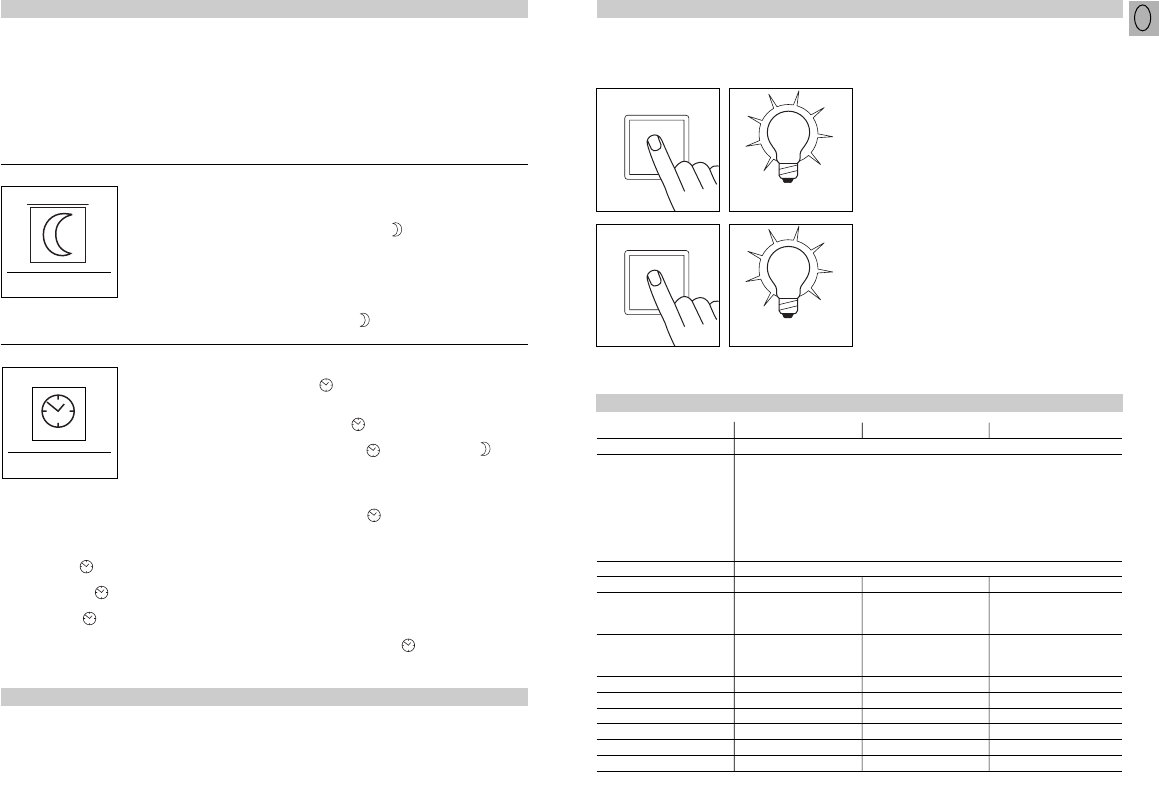
Sensor operation
1) Switch light ON (when light is OFF):
Turn switch OFF and ON once.
Light stays on for the period selected.
2) Switch light OFF (when light is ON):
Turn switch OFF and ON once.
The light goes out or switches over to sensor
mode.
Manual override function
2 x aus/an
4 Stunden
5 sec. – 15 min.
1 x OFF/ON
IS 3180 IS 3360 IS 345
Dimensions: (l x w x h) 95 x 95 x 65 mm
Output: • 2000 W max., VDE tested
(resistive load, e.g. filament bulb)
• 10 AX max., VDE tested (fluorescent tube)
• 900 W max. (series corrected)
• 500 W max. (parallel corrected,
at C = 45.6 µF
• 600 W max. (electronic ballasts, capacitive,
e.g. low-energy lamps, 8 each max.)
Mains power: 230 – 240 V, 50 Hz
Recom. mounting height: 2 m 2.5 m 3 m
Angle of coverage: 180° horizontally 360° horizontally 12 x 4 m radially
90° vertically 180° vertically 20 x 4 m tangentially
Reaches: – 20 m max. all-round 20 x 4 m max.
Basic setting 1: 4 – 8 m max. – –
Basic setting 2: 8 – 20 m max. – –
Detection levels: 7 10 5
Switching zones: 448 1416 280
Twilight setting: 2 – 2000 lux 2 – 2000 lux 2 – 2000 lux
Time setting: 5 sec. – 15 min. 5 sec. – 15 min. 5 sec. – 15 min.
Manual override: selectable (4 h) selectable (4 h) selectable (4 h)
Enclosure: IP 54 IP 54 IP 54
Technical specifications
Manual override
1) Select manual override :
Turn switch OFF and ON twice. The lamp is
set to stay on for 4 hours (red LED lights up
behind the lens). Then it returns automatically
to sensor mode (red LED off).
2) Deactivate manual override:
Turn switch OFF and ON once. The light goes
out or switches over to sensor mode.
2 x aus/an
4 Stunden
4 hours
2 x OFF/ON
If a mains switch is installed in the mains supply
lead, the light is capable of the following func-
tions in addition to the simple ON/OFF function:
Important: The switch should be actuated in
rapid succession (in the 0.5 – 1 sec. range).
16
The system can be put into operation once the
mains power has been connected and the unit
is closed. Two setting options are concealed
behind the decorative faceplate.
Pressing a programming button sets the
sensor to programming mode.
This means:
- The lamp connected always goes out
- Sensor function is deactivated
- Manual override function (if active) is can-
celled
The settings may be altered as often as you
wish. The last setting will remain stored in the
memory in the event of power failure.
Important: Only select time and twilight
setting with the lens in place.
Functions
a) Selecting twilight setting of your choice:
At the light level at which you now want the
sensor to respond to movement and switch on
light, press the button until the red LED
flashes (in the lens). This light level will now be
stored.
Important: When setting, do not cover the lens
or shade it with your own shadow.
b) Setting night-time operation (4 lux) during
the day
Keep the button pressed for approx. 5 sec-
onds until the red LED stops flashing in the lens.
(factory setting:
daylight operation
2000 lux)
Twilight setting (response threshold)
2 – 2000 lux
The ON time can be varied continuously
between approx. 5 sec. and a maximum of
15 min.
(factory setting:
approx. 5 sec.)
Time setting (switch OFF delay)
5 sec. - 15 min.
- To select the shortest time setting, press
button twice in brief succession.
b) Setting ON time to the accuracy of one
minute
- Keep button pressed until red LED
flashes (in the lens).
- Release button , now keep button
pressed until LED goes out and (after 3 sec.)
starts to flash again (slower).
- After the chosen number of flashes (each
LED flash equals 1 minute of light ON time),
re-press button until LED goes out.
Your chosen time is now stored to the
accuracy of a minute.
- This process is terminated automatically
after the maximum number of flashes
(15 times = 15 min.).
c) Pulse function
The pulse function activates the output for
2 sec. (e.g. for staircase lighting time switches).
To do this, keep button pressed
for approx. 5 sec. until the red LED stops
flashing.
a) Setting ON time to the accuracy of one
second
- Keep button pressed until red LED flashes
(in the lens).
- Release button and wait until chosen ON
time is shown (LED flashes).
- Press button again until LED goes out.
Your chosen time is now stored to the
accuracy of a second.
- This process is terminated automatically
after the maximum selectable time (15 min.).
All settings can be returned to their original
levels (daylight operation 2000 lux, ON dur-
ation 5 seconds) whenever you wish.
To do this, keep both buttons pressed simul-
taneously until the LED (in the lens) comes on
and goes out again (approx. 5 seconds).
Reset function
The sensor's response threshold can be set
to between approx. 2 lux and 2000 lux.
GB
BDAL_IS3180_24spr_neu 21.11.2007 11:08 Uhr Seite 17


Pridružite se razgovoru o ovom proizvodu
Ovdje možete podijeliti što mislite o Steinel IS 3360 Detektor kretanja. Ako imate pitanja, prvo pažljivo pročitajte priručnik. Zahtjev za priručnik možete izvršiti putem našeg obrasca za kontakt.
odgovori | Ovo je bilo korisno (1) (Preveo Google)